I’ve been clicking the Next Post button on Kagi Small Web quite a bit.
It’s like the StumbleUpon of yore (a “bar” across the top and randomized <iframe>d websites below) except all the websites it brings you to are people’s personal blogs.
It’s just a charming experience because you land on websites that you’d very likely never land on, but can be entirely interesting. It’s true.

Collection of thoughts!
Some people’s sites don’t take kindly to being iframed. Some will try to break out of it. Some will just refuse to load.

I suspect a lot of people don’t even know that about their own site, it’s something imposed by the host. If I had to guess why, it’s because there is this security concern called “clickjacking”. If a site is allowed to be iframed, technically, someone could position like hidden inputs directly over inputs on the site and it could look like you are entering information on the real website but are really giving data to a nefarious website. The only way around it is to prevent iframing at all.
The fact that the site you’re looking at is iframed means you can’t just copy the URL quick, in case you’re trying to share or bookmark it or whatever. It’s not impossible, you just click the URL and it pops you out, but then you’ve kinda left the flow.
It’s not just the sharing that has a “breaks the web” feeling, it’s the back and forward buttons too. If you leave a site without meaning to, you ain’t finding it again. It’s not in your browsing history, you can’t press “back” to get back there, and there is nothing saved to your Kagi account or anything, which I suspect is partially because this is an MVP thing and partially because I think Kagi is privacy focused and saving user data opens up a can of worms there.
All the awkwardness with iframes makes me think that this thing shouldn’t be iframing at all. My opinion is that it should be a browser extension, which takes you right to the sites directly. The browser extension could offer the same options/controls. I think anyway! Have you seen the sidePanel API? (sidebarAction on Firefox, unclear what Safari offers) I think that might be the ticket to get persistent UI while using it.
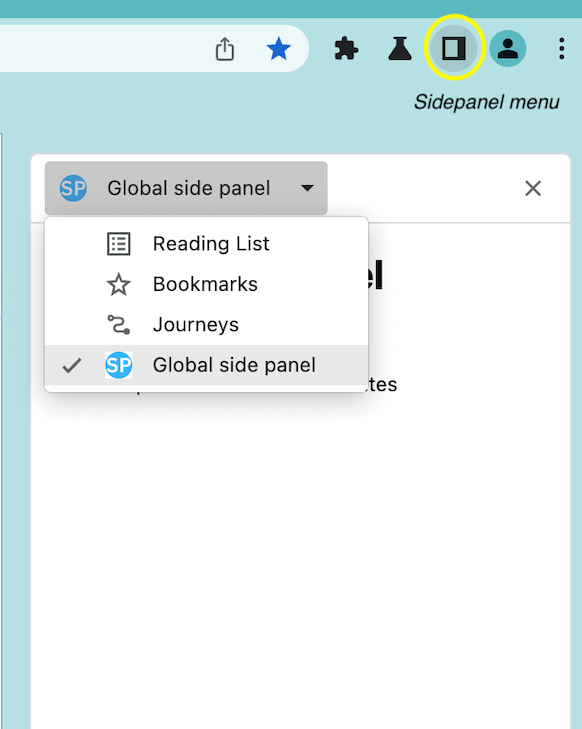
I know Tango was eyeing up side panels highly because their extension would benefit highly from it, but ultimately went with a popup window (probably for browser consistency?).
There is an “Appreciate” button and a “Leave a Note” button. I like the idea! I don’t totally understand how they work. I’ve used both, but:
I suspect when other people come across that same site, it’ll have a number listed if other people appreciated it, but again I’ve never seen that, nor a note left. If the notes are just sitting there, that also feels weird, because allowing people to leave anonymous messages on the internet is just something that never ends well.
Poking around a little, I see they did mention it in the intro blog post:
Here, you can “appreciate” a post or jot down a temporary public note about it. These notes will vanish in about a week as we cycle in new content – emphasizing the fleeting, imperfect nature of the small web.
Wow, a lot of personal sites are ugly. 😬😬😬
Not trying to be a jerk, it’s just surprising (and a little comforting in a weird way, like how you don’t want a bowling alley to be too nice). I also find it surprising that if a site looks decent (to me), there is a good chance it’s a pretty off-the-shelf decent WordPress theme.
Related
ncG1vNJzZmibmKe2tK%2FOsqCeql6jsrV7kWlpbGdhZXxxfo6kmKChXai6orjLZq6eml8%3D